저자: 包小猩
After-Tonemap 포스트 프로세스 패스를 작성해서 시각화 디버깅에 사용했는데, 기본 상태에서는 정상적으로 보이다가 에디터 뷰포트 크기를 드래그해서 변경하면 화면이 왼쪽 위 작은 사각형 영역으로 줄어들고 나머지 영역은 검게 되는 문제가 생겼다. 대략 아래 이미지처럼.
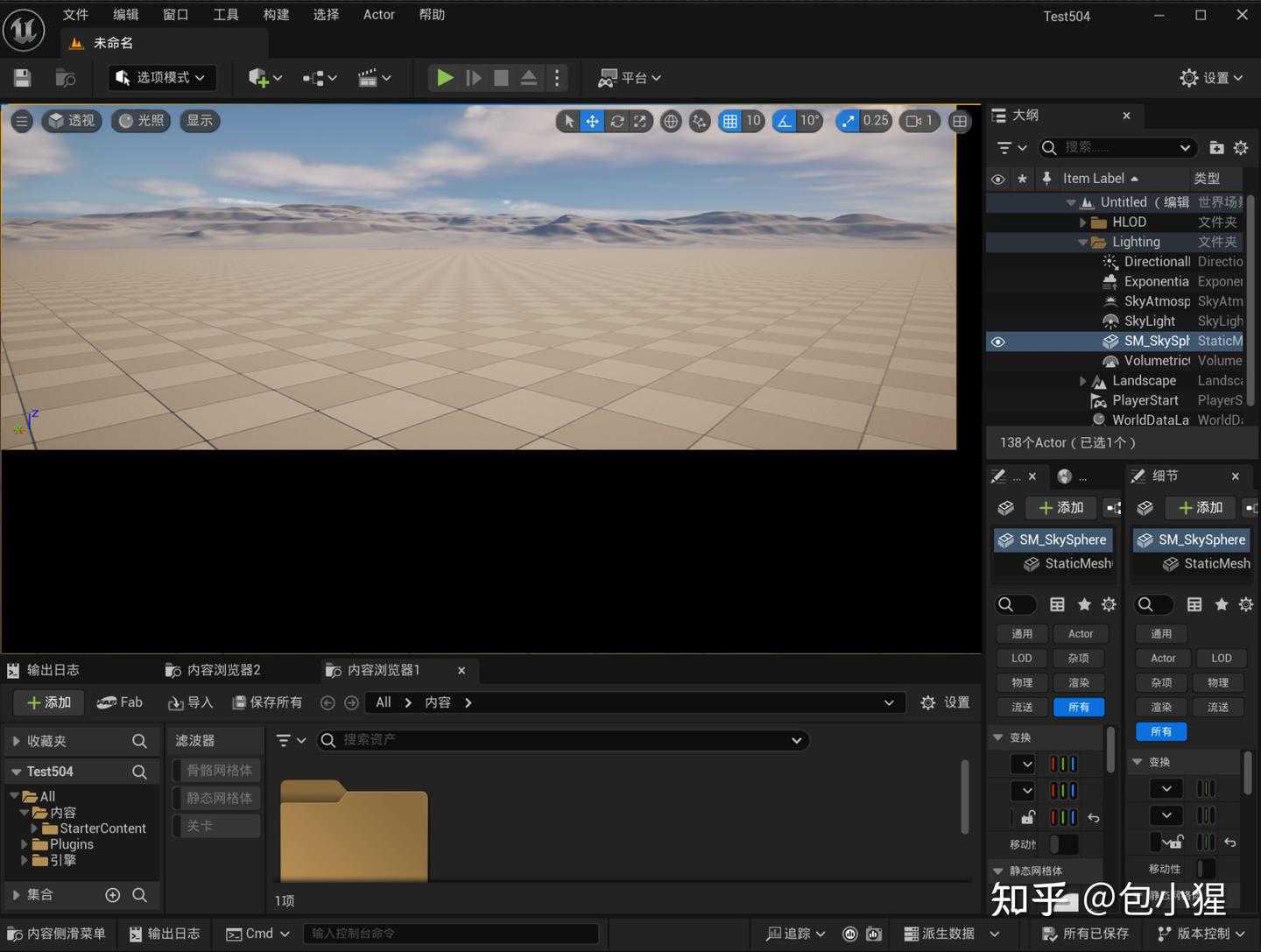
이게 왜 그러냐고? 스크린 UV를 그대로 가져왔는데 왜 샘플링이 틀어지는 거냐고!!
진정하자. 코드 한 줄만 바꾸면 바로 해결된다:
// ❌ 잘못된 방법
const FScreenPassTextureViewport InputViewport(SceneColor.Texture);

// ✅ 올바른 방법
const FScreenPassTextureViewport InputViewport(SceneColor);
생성자 인자 하나 차이로 왜 화면 전체가 박살나는 걸까? 이 문제를 이해하려면 UE5의 ScreenPass UV 시스템부터 이야기해야 한다.
1. 왜 Texture 크기 ≠ 뷰포트 크기인가?
UE5의 렌더 타겟(RenderTarget)은 풀(Pool) 재사용 방식을 쓴다. 에디터 뷰포트를 1920×1080에서 1280×720으로 줄여도, 엔진은 기존 1920×1080 텍스처를 즉시 해제하고 1280×720짜리를 새로 만들지 않는다. 대신 그 큰 텍스처를 그대로 재사용하면서 1280×720 크기의 서브 영역에만 렌더링한다.
이 때문에 두 가지 개념이 생긴다:
개념 의미 예시
| Texture Extent | 텍스처의 물리적 크기 | 1920×1080 |
| ViewRect | 텍스처 내 실제로 사용하는 직사각형 영역 | (0,0) → (1280,720) |
FScreenPassTexture는 이 두 정보를 함께 저장한다:
struct FScreenPassTexture
{
    FRDGTextureRef Texture;   // 물리 텍스처, Extent가 매우 클 수 있다
    FIntRect ViewRect;        // 실제 유효 뷰포트 직사각형
};
Texture만으로 UV를 매핑하면, 1280×720 뷰포트 콘텐츠를 1920×1080 전체 텍스처 공간에 매핑하게 된다 — 당연히 화면이 왼쪽 위로 쪼그라들 수밖에 없다.
2. FScreenPassTextureViewport: 생성자가 운명을 결정한다
FScreenPassTextureViewport는 ScreenPass 프레임워크의 핵심 타입으로, Extent와 Rect 두 필드를 캡슐화한다:
struct FScreenPassTextureViewport
{
    FIntPoint Extent;   // 텍스처 크기 (상위 집합)
    FIntRect Rect;      // 뷰포트 직사각형 (하위 집합)
};
핵심: 생성자에 따라 Rect를 초기화하는 방식이 달라진다:
// 생성자 1: FScreenPassTexture로 구성 (권장)
// Extent = Texture 크기, Rect = SceneColor.ViewRect
FScreenPassTextureViewport(FScreenPassTexture InTexture);

// 생성자 2: FRDGTextureRef로 구성 (위험!)
// Extent = Texture 크기, Rect = (0,0) → Extent  ← Rect가 텍스처 전체로 설정됨!
FScreenPassTextureViewport(FRDGTextureRef InTexture);
생성자 2는 Rect를 텍스처 전체 범위로 기본 설정한다. 뷰포트가 왼쪽 위 일부만 사용한다는 사실을 모르는 것이다. 이 Viewport를 AddDrawScreenPass에 전달하면 버텍스 셰이더가 텍스처 전체에 풀스크린 삼각형을 그리게 되고, 당연히 UV 매핑이 틀어진다.
철칙 하나
FScreenPassTextureViewport(SceneColor)를 쓸 것. FScreenPassTextureViewport(SceneColor.Texture)는 쓰지 말 것.
3. UV 매핑 전체 데이터 흐름
ScreenPass의 UV는 C++에서 셰이더까지 세 단계를 거친다:
1단계: C++ 측 파라미터 설정
// InputViewport와 OutputViewport를 전달
AddDrawScreenPass(GraphBuilder, PassName, ViewInfo,
    OutputViewport, InputViewport,
    VertexShader, PixelShader,
    PassParameters);
AddDrawScreenPass 내부에서 DrawScreenPass를 호출해 OutputViewport/InputViewport를 DrawRectangleParameters(UniformBuffer)로 변환한다. 여기에 PosScaleBias와 UVScaleBias가 포함된다.
또한 셰이더에서 쓸 Viewport 파라미터를 직접 전달해야 한다:
// SceneColor의 ViewRect 정보를 14개의 float/uint 파라미터로 패킹
PassParameters->Color = GetScreenPassTextureViewportParameters(
    FScreenPassTextureViewport(SceneColor));
2단계: 버텍스 셰이더
// ScreenPass.usf의 FScreenPassVS
void ScreenPassVS(
    in float4 InPosition : ATTRIBUTE0,
    in float2 InTexCoord : ATTRIBUTE1,
    out noperspective float4 OutUVAndScreenPos : TEXCOORD0,
    out float4 OutPosition : SV_POSITION)
{
    DrawRectangle(InPosition, InTexCoord, OutPosition, OutUVAndScreenPos);
}
DrawRectangle 함수(Common.ush)는 DrawRectangleParameters를 이용해 두 가지를 처리한다:
- 입력 위치를 OutputViewport의 NDC 공간으로 매핑 → OutPosition
- 입력 UV를 InputViewport의 텍스처 공간 Buffer UV로 매핑 → OutUVAndScreenPos.xy
구체적인 계산식(Common.ush 참고):
OutTexCoord.xy = (UVScaleBias.zw + InTexCoord.xy * UVScaleBias.xy)
                 * InvTargetSizeAndTextureSize.zw;
// 즉 = (InputRect.Min + InTexCoord * InputRect.Size) / TextureExtent
InTexCoord가 0에서 1로 변할 때:
- 0 → InputRect.Min / TextureExtent = UVViewportMin
- 1 → (InputRect.Min + InputRect.Size) / TextureExtent = UVViewportMax
핵심: OutUVAndScreenPos.xy는 이미 Buffer UV(범위 [UVViewportMin, UVViewportMax])이지, [0,1] 정규화 UV가 아니다! 텍스처 샘플링에 그대로 쓸 수 있고, 추가 재매핑은 필요 없다. UE5 내장 CopyRectPS가 바로 Texture2DSample(InputTexture, InputSampler, UV)를 직접 호출하는 이유가 여기 있다.
3단계: 픽셀 셰이더
SCREEN_PASS_TEXTURE_VIEWPORT(Color);  // 14개 변수로 전개

void MyPS(
    noperspective float4 UVAndScreenPos : TEXCOORD0,
    float4 SvPosition : SV_POSITION,
    out float4 OutColor : SV_Target0)
{
    // UVAndScreenPos.xy는 버텍스 셰이더에서 이미 Buffer UV로 변환됨
    // 범위 [UVViewportMin, UVViewportMax], 텍스처 직접 샘플링 가능
    // 양선형 보간 오버플로 방지를 위해 안전 범위로만 클램프
    float2 BufferUV = clamp(UVAndScreenPos.xy,
        Color_UVViewportBilinearMin, Color_UVViewportBilinearMax);

    float4 Scene = Texture2DSample(SceneTex, SceneTexSamplerState, BufferUV);
}
흔한 실수:
BufferUV = UV * Color_UVViewportSize + Color_UVViewportMin
이중 매핑 오류
4. SCREEN_PASS_TEXTURE_VIEWPORT 매크로: 14개 파라미터 정체
셰이더에서 SCREEN_PASS_TEXTURE_VIEWPORT(Color)를 전개하면 (Color_ 접두사로) 다음 파라미터들이 생긴다:
파라미터 타입 의미
| Extent | float2 | 텍스처 물리 크기 (예: 1920×1080) |
| ExtentInverse | float2 | 1.0 / Extent |
| ViewportMin | uint2 | 뷰포트 좌상단 픽셀 좌표 |
| ViewportMax | uint2 | 뷰포트 우하단 픽셀 좌표 |
| ViewportSize | float2 | 뷰포트 픽셀 크기 = Max - Min |
| ViewportSizeInverse | float2 | 1.0 / ViewportSize |
| UVViewportMin | float2 | 뷰포트 좌상단 정규화 UV = ViewportMin / Extent |
| UVViewportMax | float2 | 뷰포트 우하단 정규화 UV = ViewportMax / Extent |
| UVViewportSize | float2 | 뷰포트 UV 크기 |
| UVViewportSizeInverse | float2 | 1.0 / UVViewportSize |
| UVViewportBilinearMin | float2 | UV 안전 샘플링 하한 (반 픽셀 안쪽) |
| UVViewportBilinearMax | float2 | UV 안전 샘플링 상한 (반 픽셀 안쪽) |
| ScreenPosToViewportScale | float2 | NDC → 픽셀 스케일 |
| ScreenPosToViewportBias | float2 | NDC → 픽셀 오프셋 |
핵심 이해:
- UVViewportMin/Max는 [0,1] 전체 범위가 아닌 Extent(텍스처 크기) 기준으로 정규화된 값이다
- ViewRect가 전체 텍스처와 다를 경우 UVViewportMin > 0 이거나 UVViewportMax < 1이다
- BilinearMin/Max는 Min/Max에서 각각 반 텍셀씩 안으로 들어온 값으로, 양선형 샘플링 오버플로를 방지한다
- 버텍스 셰이더가 출력한 UVAndScreenPos.xy의 범위는 [UVViewportMin, UVViewportMax]이므로, 픽셀 셰이더에서 BilinearMin/Max로 클램프만 하면 안전하게 샘플링된다. UV * UVViewportSize + UVViewportMin 재매핑은 하지 말 것
5. 이웃 픽셀 샘플링은 어떻게 하나?
엣지 검출, 블러, 외곽선 등의 효과를 만들 때는 주변 픽셀을 샘플링해야 한다. 올바른 방법:
// ✅ ExtentInverse 사용 (텍스처 공간에서 텍셀 하나 오프셋)
float2 TexelSize = Color_ExtentInverse;
float2 OffsetU = float2(TexelSize.x, 0.0);
float2 OffsetV = float2(0.0, TexelSize.y);

// 왼쪽 이웃 픽셀 샘플링, 안전 범위로 클램프
float3 cL = Texture2DSample(SceneTex, Samp,
    clamp(BufferUV - OffsetU, Color_UVViewportBilinearMin, Color_UVViewportBilinearMax)).rgb;
ViewportSizeInverse로 오프셋하지 말 것! ViewportSizeInverse = 1/뷰포트 픽셀 수인데, 텍스처 샘플링 UV는 Extent 기준으로 정규화되어 있다. 뷰포트가 텍스처의 일부만 차지하는 경우 ViewportSizeInverse로 오프셋하면 여러 텍셀을 건너뛰게 된다.
변수 단위 용도
| ExtentInverse | 1/텍스처 크기 | 텍스처 공간 이웃 오프셋 ✅ |
| ViewportSizeInverse | 1/뷰포트 크기 | 정규화 계산 (예: 화면 점유율) |
| UVViewportSizeInverse | 1/UV 뷰포트 | UV 공간 역매핑 |
6. 깊이 샘플링 시 주의사항
패스에서 뎁스 버퍼를 읽어야 한다면 UV 정렬에 마찬가지로 주의해야 한다:
// 같은 BufferUV로 뎁스 텍스처 샘플링
float DeviceZ = Texture2DSampleLevel(
    SceneTexturesStruct.SceneDepthTexture,
    SceneTexturesStruct.PointClampSampler,
    BufferUV, 0).r;
float SceneDepth = ConvertFromDeviceZ(DeviceZ);
C++ 측에서 SceneTextures 유니폼 버퍼를 전달해야 한다:
`// 셰이더 파라미터 선언 SHADER_PARAMETER_RDG_UNIFORM_BUFFER(FSceneTextureUniformParameters, SceneTextures)
// C++ 설정 PassParameters->SceneTextures = SceneTextures.SceneTextures;`
뎁스 텍스처의 Extent는 보통 SceneColor와 동일하므로, 같은 BufferUV로 샘플링해도 안전하다.
7. C++ 측 표준 템플릿 (전체)
void RenderMyCustomPass(
    FRDGBuilder& GraphBuilder,
    const FViewInfo& ViewInfo,
    const FScreenPassTexture& SceneColor,
    const FScreenPassRenderTarget& Output)
{
    // ✅ SceneColor(ViewRect 포함)로 구성, SceneColor.Texture 쓰지 말 것
    const FScreenPassTextureViewport InputViewport(SceneColor);
    const FScreenPassTextureViewport OutputViewport(static_cast<FScreenPassTexture>(Output));

    FMyShaderPS::FParameters* PassParameters =
        GraphBuilder.AllocParameters<FMyShaderPS::FParameters>();

    // ✅ 마찬가지로 SceneColor로 Viewport 파라미터 구성
    PassParameters->Color = GetScreenPassTextureViewportParameters(
        FScreenPassTextureViewport(SceneColor));

    PassParameters->SceneTex = SceneColor.Texture;
    PassParameters->SceneTexSamplerState = TStaticSamplerState<>::GetRHI();
    PassParameters->RenderTargets[0] = FRenderTargetBinding(
        Output.Texture, ERenderTargetLoadAction::ELoad);

    const TShaderMapRef<FScreenPassVS> VertexShader(ViewInfo.ShaderMap);
    const TShaderMapRef<FMyShaderPS> PixelShader(ViewInfo.ShaderMap);

    ClearUnusedGraphResources(PixelShader, PassParameters);

    // ✅ OutputViewport와 InputViewport 모두 ViewRect 기반
    AddDrawScreenPass(
        GraphBuilder, RDG_EVENT_NAME("My Custom Pass"),
        ViewInfo,
        OutputViewport, InputViewport,
        VertexShader, PixelShader,
        PassParameters);
}
8. 셰이더 측 표준 템플릿 (전체)
#include "/Engine/Private/Common.ush"
#include "/Engine/Private/ScreenPass.ush"

Texture2D<half4> SceneTex;
SamplerState SceneTexSamplerState;
SCREEN_PASS_TEXTURE_VIEWPORT(Color);

void MainPS(
    noperspective float4 UVAndScreenPos : TEXCOORD0,
    float4 SvPosition : SV_POSITION,
    out float4 OutColor : SV_Target0)
{
    // Step 1: Buffer UV 가져오기 (버텍스 셰이더에서 이미 매핑됨)
    // UVAndScreenPos.xy 범위 = [UVViewportMin, UVViewportMax]
    // 안전 샘플링 범위로 클램프만 하면 됨
    float2 BufferUV = clamp(UVAndScreenPos.xy,
        Color_UVViewportBilinearMin, Color_UVViewportBilinearMax);

    // Step 2: 샘플링
    float4 Scene = Texture2DSample(SceneTex, SceneTexSamplerState, BufferUV);

    // Step 3: 이웃 픽셀 샘플링이 필요한 경우
    // ExtentInverse = 1/텍스처 크기, Buffer UV 공간에서 텍셀 하나의 오프셋
    float2 TexelSize = Color_ExtentInverse;
    float3 cRight = Texture2DSample(SceneTex, SceneTexSamplerState,
        clamp(BufferUV + float2(TexelSize.x, 0),
              Color_UVViewportBilinearMin, Color_UVViewportBilinearMax)).rgb;

    // Step 4: 스크린 스페이스 위치(픽셀 좌표)가 필요한 경우
    // SvPosition.xy는 이미 픽셀 좌표, 그대로 사용 가능
    float2 ScreenPixel = SvPosition.xy;

    OutColor = Scene;
}
9. 흔한 실수 빠른 참조표
실수 증상 수정
| FScreenPassTextureViewport(Texture) 대신 (SceneColor) 미사용 | 창 드래그 시 화면이 왼쪽 위로 쪼그라듦 | FScreenPassTextureViewport(SceneColor) 사용 |
| PS에서 UV * UVViewportSize + UVViewportMin 이중 매핑 | 화면이 왼쪽 위 작은 영역으로 줄거나 창 크기 변경 시 어긋남 | VS에서 이미 Buffer UV가 매핑됨, BilinearMin/Max로 클램프만 할 것 |
| 이웃 오프셋에 ViewportSizeInverse 사용 | 작은 창에서 블러/외곽선이 과하게 강해짐 | ExtentInverse 사용 |
| BilinearMin/Max 클램프 누락 | 뷰포트 가장자리에 검은 선이나 색 블록 발생 | clamp 추가 |
| GetScreenPassTextureViewportParameters에 Texture-only Viewport 전달 | 셰이더의 UV 파라미터 전체 오류 | ViewRect가 포함된 Viewport 전달 |
| interpolant에 noperspective 누락 | 비직교 투영에서 UV 보간 오류 | noperspective 추가 |
10. 정리
UE5 ScreenPass UV 시스템은 '텍스처 크기 ≠ 뷰포트 크기' 문제를 범용적으로 처리하기 위해 설계되었다. 렌더 타겟 풀 재사용은 성능 최적화의 핵심 전략이지만, 그 대가로 UV [0,1]이 곧 화면 전체 범위라는 가정을 해서는 안 된다.
세 가지 규칙만 기억하자:
- Viewport 생성은 FScreenPassTexture로, 날 FRDGTextureRef는 쓰지 말 것
- PS에서 UVAndScreenPos.xy를 그대로 Buffer UV로 사용하고, BilinearMin/Max로 클램프만 할 것. UV * UVViewportSize + UVViewportMin 재매핑은 금지
- 이웃 오프셋은 ExtentInverse로, ViewportSizeInverse는 쓰지 말 것
이 세 가지를 지키면, 어떤 해상도, 어떤 뷰포트 크기에서도 포스트 프로세스 패스가 올바르게 동작한다.
원문
(23 条消息) [小技巧] UE5 后处理 ScreenPass 中正确获取编辑器Viewport UV - 知乎
'TECH.ART.FLOW.IO' 카테고리의 다른 글
| [번역] 명일방주: 엔드필드 캐릭터 렌더링 (Unity URP) (1) | 2026.04.13 |
|---|---|
| [발표 번역] UF2025(Shanghai)—《델타포스》글로벌 일루미네이션 기술 심층 분석: Lightmap에서 Lumen까지 크로스플랫폼 구현의 여정 (0) | 2026.04.10 |
| [번역] 제로에서 구현한 간편한 FluidFluxWater 물 렌더링 파트 2 (0) | 2026.04.04 |
| [번역] 제로에서 구현한 간편한 FluidFluxWater 물 렌더링 파트 1 (0) | 2026.04.01 |
| [번역] Unreal Engine의 UAV Overlap 특성과 나의 기나긴 사투 (0) | 2026.03.27 |